ReachHawks
Hawk AI · Assistant + Manager

A sharp eye on every reply. A confident path to every next step.

Hawk AI studies your business, watches every response, and turns conversations into the right next action across email, LinkedIn, Slack, calendars, Unibox and CRM.

Claude · OpenAI · Gemini · DeepSeek Calendly · Cal.com Slack approvals

Hawk Instincts

Reply Intelligence
EYE_01

Sharp-Eye Business Analysis

Hawk AI analyzes your website like a hawk — learning your tone, pricing, business model, offer, FAQs and customer context before it replies.

Website Intelligence · Active
FLIGHT_02

Multi-Model Intelligence

Connect Claude, OpenAI, Gemini or DeepSeek. Hawk AI keeps the same ReachHawks workflow, business memory and training context while you choose the model layer.

Model Layer · Connected
CONTROL_03

Assistant → Manager Control

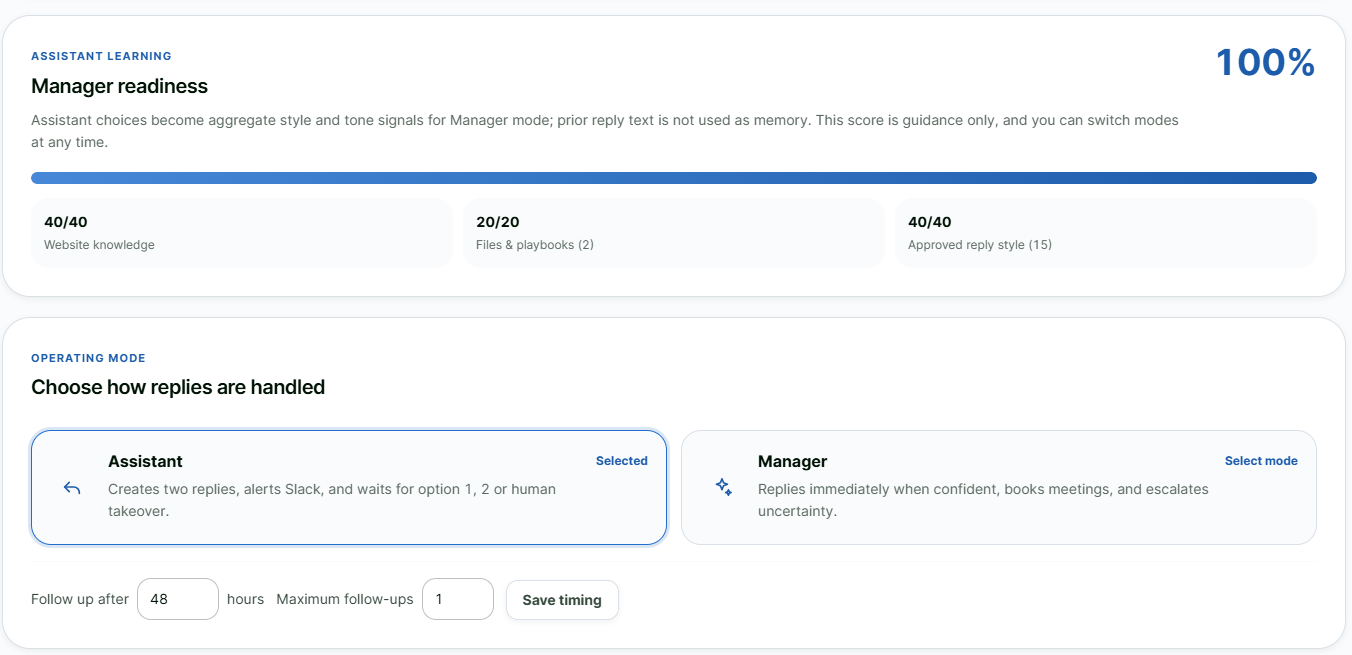
Start in Assistant Mode with two live Slack reply choices. Approvals train the system, and the confidence score tells you when Hawk AI is ready for Manager Mode.

> analyze_reply()
> propose_two_replies()
> ready_for_manager_mode()

One live view from reply to booked meeting.

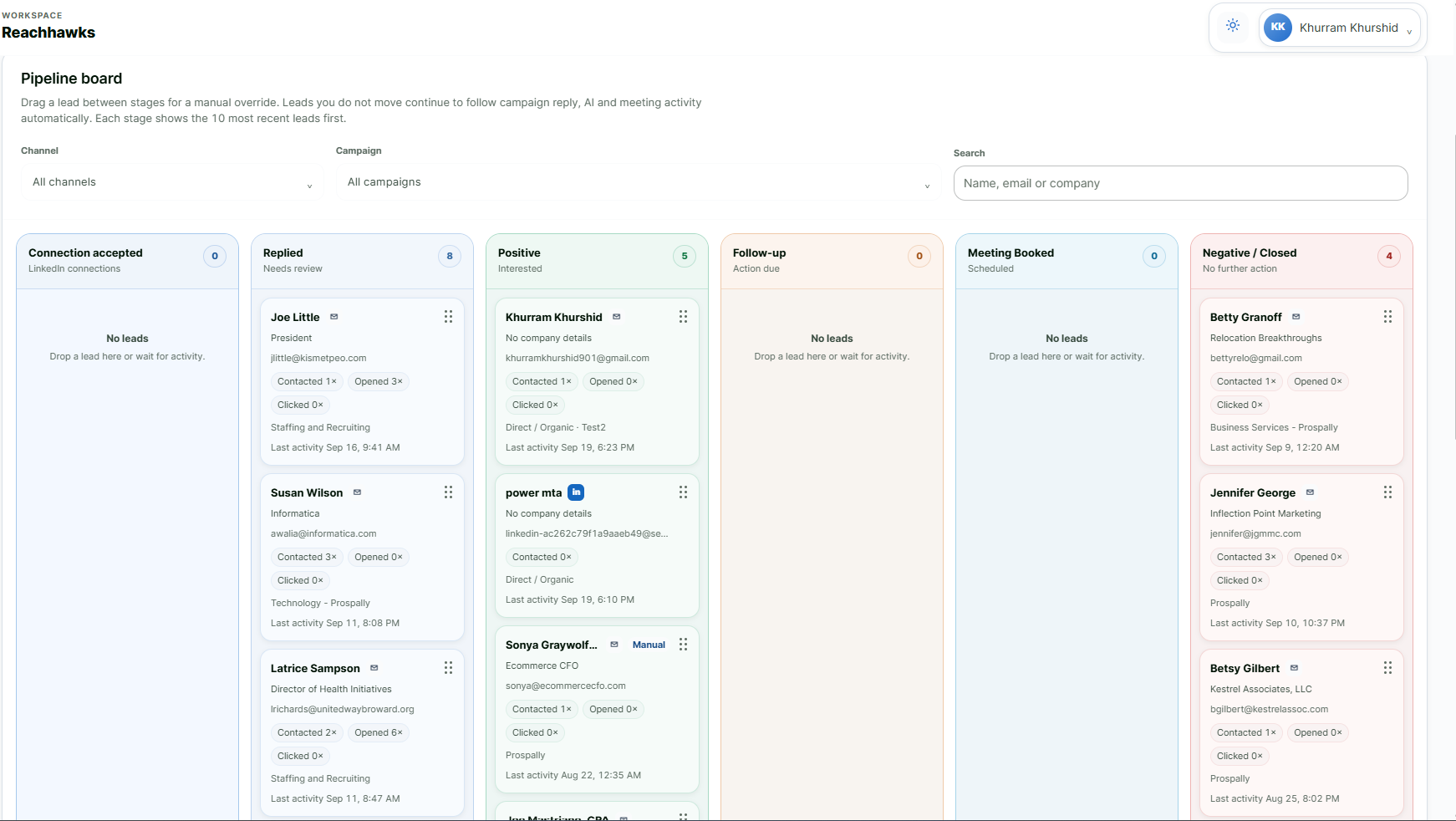
Hawk AI reads intent, keeps channel context, coordinates scheduling, updates CRM and keeps Unibox organized while every qualified conversation moves forward.

Live reply feed

Reply Intelligence

REPLY OPTIONS
2 LIVE
RESPONSES SENT
REAL-TIME
MEETING BOOKED
WHEN QUALIFIED
OPPORTUNITY
PUSHED TO CRM
Channels
Website + Docs
CRM + Unibox
Meeting Scheduled

Scheduling + Context

CALENDLY / CAL.COMLIVE AVAILABILITY
CRM UPDATESTAGE + TAGS
UNIBOX UPDATESYNCED
Context
99.91%
Conversation Context
Positive Neutral Negative

Hawk AI reads reply nature, intent and tone before choosing the right next action.

Overlap control

Prevents duplicate touchpoints and keeps reply tone, context and conversation flow from colliding across channels.

Overlap Controlled

One connected conversation layer

Email and LinkedIn can run together while Hawk AI controls overlap, duplicates and your global blocklist; classifies replies, schedules through Calendly or Cal.com, tags leads, updates CRM and keeps Unibox clean. It runs outside the native app flow, making response handling safer across email and LinkedIn.
2
Channels
Email + connected LinkedIn share one conversation context.
1
Unified Context
Tone, history and next action stay synchronized.
SAFE
Orchestration
Runs outside the native app flow for response handling.
Engine Mechanics
Step 1 · Integrations
Connect AI tools, Slack and calendars
01

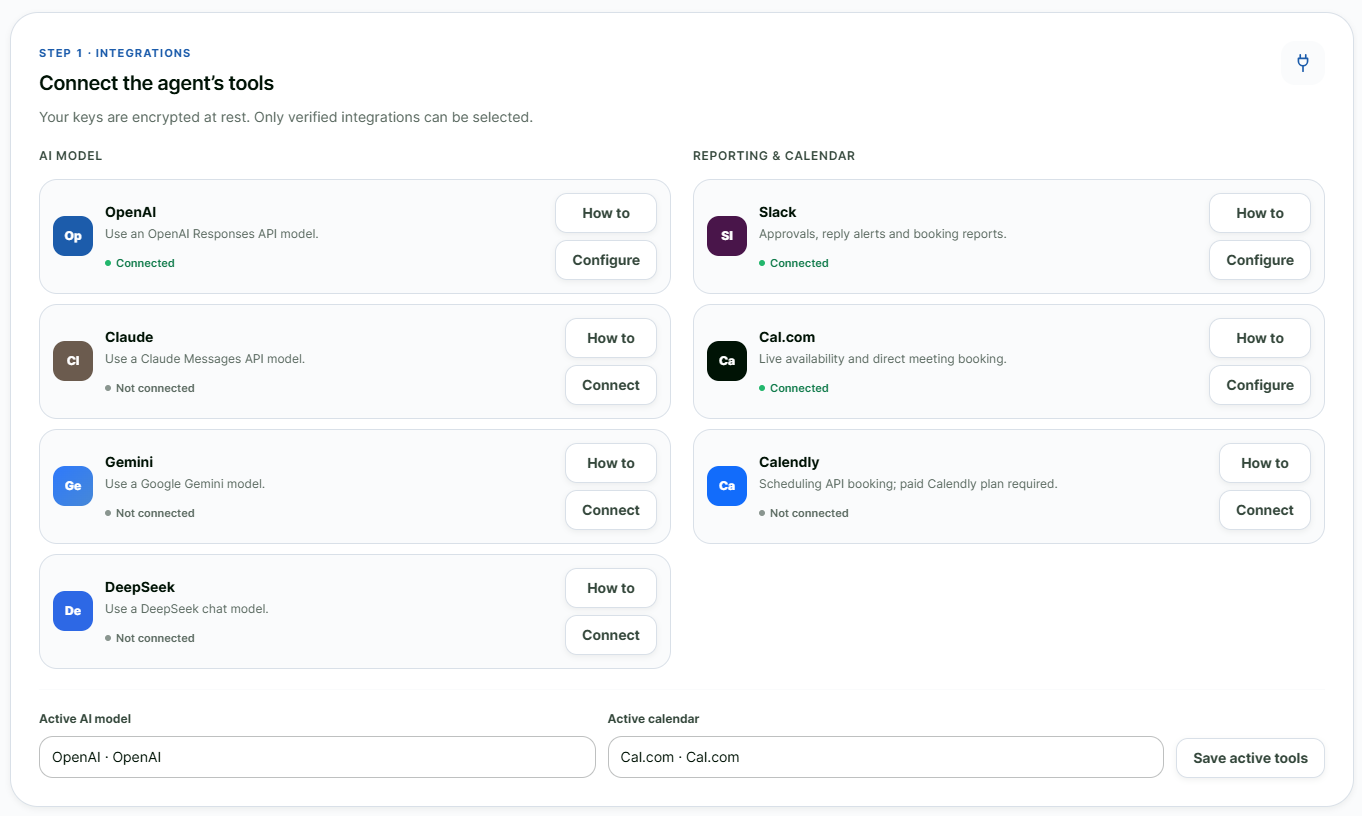
Connect your AI model, calendar and Slack

Connect Claude, OpenAI, Gemini or DeepSeek, then attach Calendly or Cal.com and Slack so Hawk AI can think, schedule and bring reply approvals into one workflow.
Control HubCONNECTED
Step 2 · Training
Website knowledge training
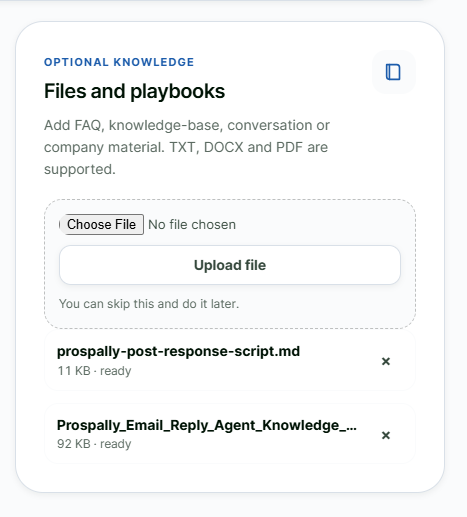
Upload PDF and DOCX training
02

Website + Document Training

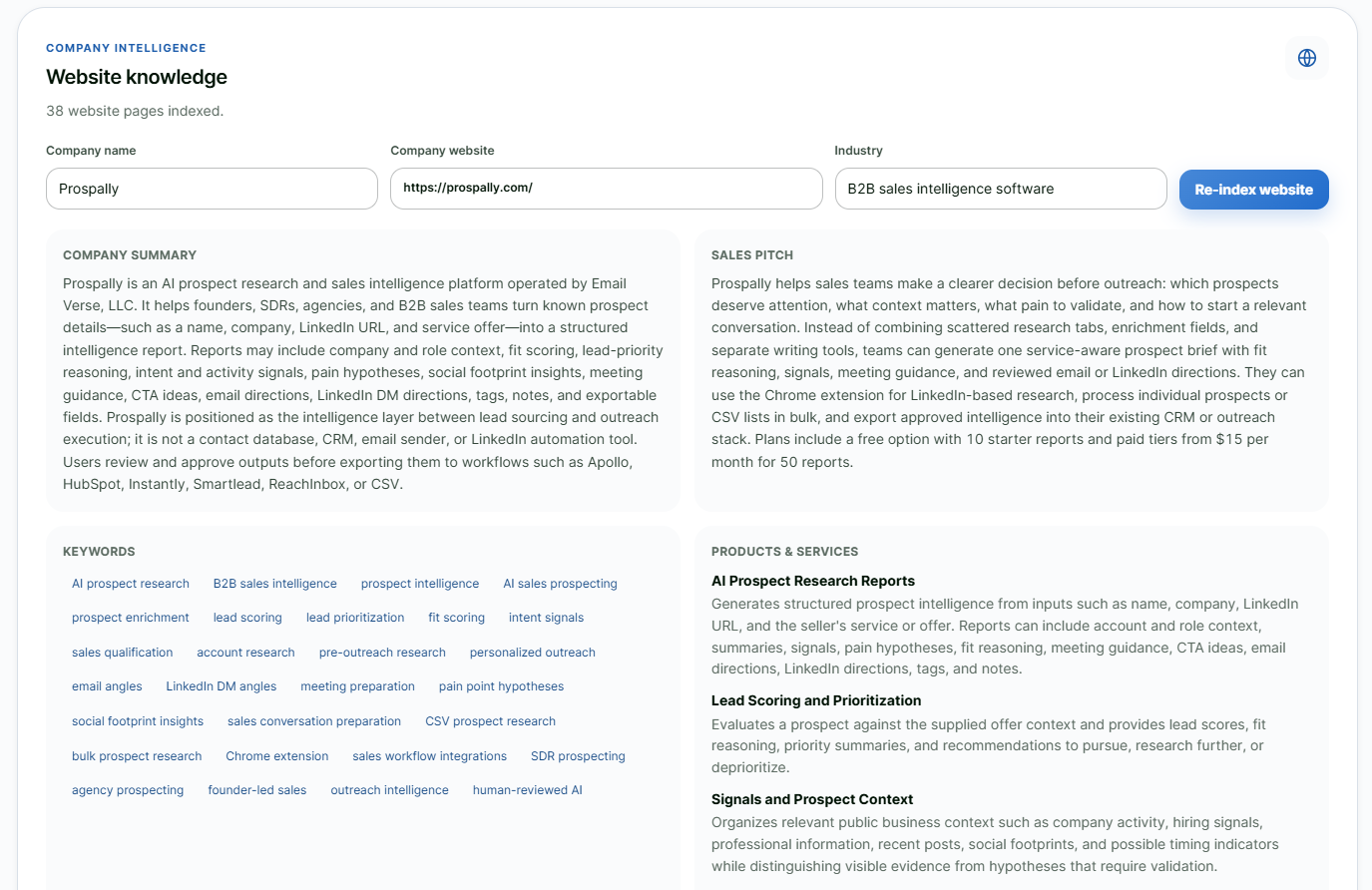
Hawk AI reads your website, PDF and DOCX files to understand tone, pricing, offers, objections, FAQs and business model before it handles replies.
KnowledgeTRAINED
Step 3 · Assistant
Slack reply approval options
Assistant mode and confidence score
03

Assistant Mode / Confidence Score

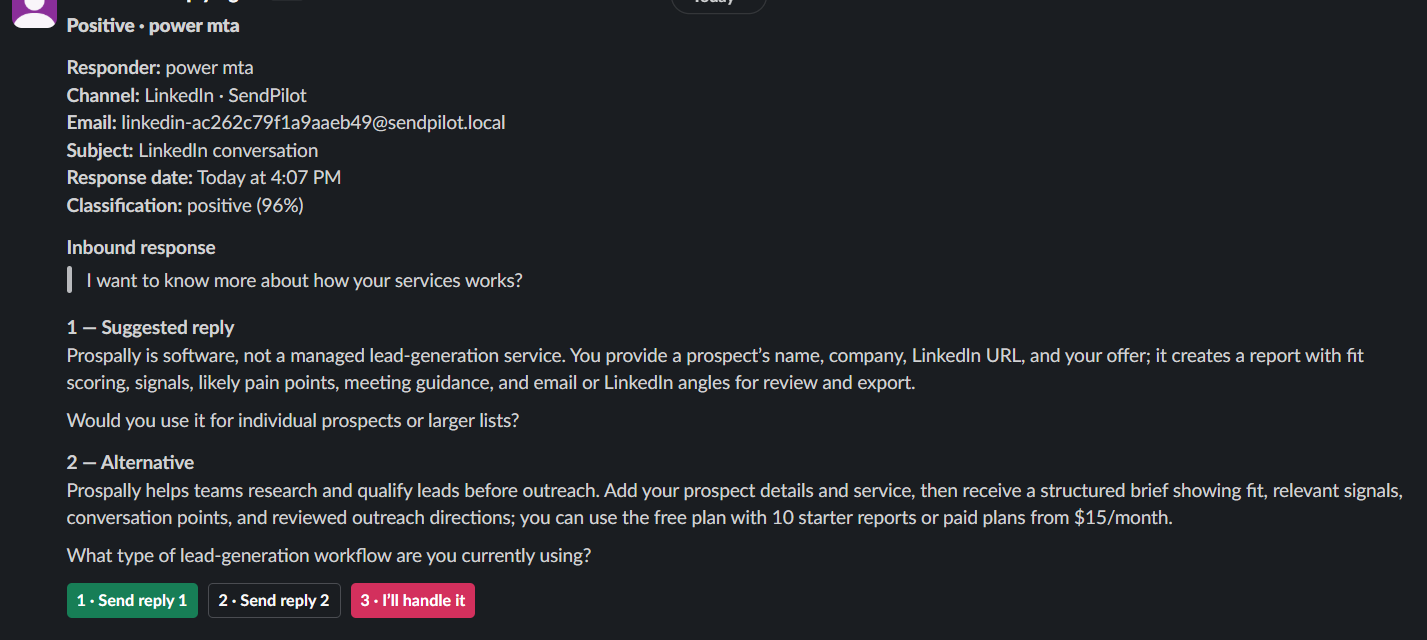
Each reply is analyzed and two options appear live in Slack. As you approve, edit or handle replies yourself, Hawk AI builds a confidence score in your style.
Readiness86% · LEARNING
Step 4 · Manager
Manager mode readiness
04

Manager Mode

Once confidence is strong enough, Hawk AI can handle back-and-forth replies in your style, qualify intent, schedule the meeting and keep the conversation moving without waiting for each approval.
ExecutionMANAGED
Step 5 · Safe Sync
Safe multi-channel control and CRM updates
05

Safe Multi-Channel Control and CRM Update

Run email + LinkedIn together while Hawk AI manages overlap, duplication and the global blocklist, tags leads correctly and updates CRM and pipeline safely outside the native apps.

Risk LayerSAFE + SYNCED

HAWK MODES

HAWK MODES

HAWK MODES

HAWK MODES

ASSISTED
Can you share pricing and a time to talk?
Hawk AI prepared two reply options in Slack for your approval.
Option A · direct
Option B · consultative
Mode 01

Human-guided replies

Review, approve, edit or handle it yourself. Every action trains Hawk AI more like you.

MANAGED
Hawk AI head
Mode 02

Autonomous conversations

Handle back-and-forth replies, book meetings, apply tags, update CRM and keep Unibox organized.

Unified Intelligence

Conversation Convergence

Calendly, Cal.com, Claude, OpenAI, Gemini, DeepSeek, Slack, email, LinkedIn, website context, DOCX knowledge, Unibox, CRM and your global list all converge around one Hawk AI core.

Hawk AI head at the center of conversation convergence
Claude
OpenAI
Gemini
DeepSeek
Slack
LinkedIn
Email
Unibox
Website
DOCX
CRM
Calendly
Cal.com
Global list
Hawk AI operating modes

Stay in control — or cut the noise completely.

Assistant Mode keeps you in the approval loop inside Slack. Manager Mode takes over the live conversation in your trained tone and behavior pattern, so you only hear about the result that matters.

Assistant Mode · live supervision

Every response arrives in Slack with two ready-to-send options.

New email / LinkedIn response
LIVE

“Interested. Can you send pricing and suggest a time next week?”

Choose
Select either reply in Slack and it is sent immediately.
I'll handle it
Take over that specific response yourself without switching off Hawk AI globally.
Mute person
Stop AI Slack alerts for that person while messages still stay in Unibox and CRM.

Live channel awareness

A reply from email or LinkedIn triggers one Slack notification with the conversation context and two response options.

Human controlled

Every choice improves training

Your approvals, edits, manual handling and mute choices become signals that help Hawk AI learn how you prefer conversations to be handled.

Best for

Training, oversight and controlled delegation.

Hawk AI FAQ

How the AI reply agent works.

Clear answers about models, training, Assistant Mode, Manager Mode, scheduling, AI usage and safe email + LinkedIn orchestration.

What does Hawk AI do?
Hawk AI is ReachHawks’ AI reply agent. It analyzes incoming conversations, classifies intent, prepares or sends replies based on the active mode, coordinates meeting booking, applies lead tags, updates CRM and helps keep Unibox organized.
Which AI models can Hawk AI connect to?
Hawk AI can connect to supported models including Claude, OpenAI, Gemini and DeepSeek. The selected model handles generation while ReachHawks keeps the workflow, business context and training layer consistent.
How does Hawk AI learn my business and writing style?
It can analyze your website for tone, pricing, business model, offers and key customer context, and it can be trained with PDF and DOCX files. In Assistant Mode, your approvals, edits and manual replies provide additional signals about how you prefer to communicate.
What is the difference between Assistant Mode and Manager Mode?
Assistant Mode sends a live Slack notification when an email or connected LinkedIn response arrives and presents two reply options. You can choose one for immediate sending, handle that specific response yourself, or mute AI Slack notifications for that person while the conversation remains stored in Unibox and CRM. Manager Mode is the fully automated conversation mode: it replies live in your trained tone and behavior pattern, handles rejection and DNC, manages CRM actions, coordinates calendar booking from availability and prospect requests, and reduces routine notifications so you can focus on scheduled meetings.
What does the training confidence score mean?
The confidence score is a readiness signal based on Hawk AI’s accumulated training context and your supervised reply behavior. It helps you decide when you are comfortable moving from Assistant Mode to Manager Mode; it is not a guarantee of a business outcome.
Can Hawk AI book meetings automatically?
Yes. Hawk AI can connect with Calendly or Cal.com and use calendar availability to coordinate a professional meeting time with an interested prospect.
Can Hawk AI handle both email and LinkedIn replies?
Yes, when the relevant channel integrations are connected. Email conversations can be handled inside ReachHawks, while LinkedIn reply workflows can be connected through SendPilot or HeyReach so Hawk AI can preserve context across both channels.
How do AI credits work?
AI cost depends on which AI model you use, the number of replies handled and the amount of conversation context being processed. As a simple planning estimate, at an average AI cost of about $0.0100 per handled reply, 1,000 replies would be about $10. Actual usage can be higher or lower depending on the selected model and conversation length. You can use your own supported AI API key, or choose a ReachHawks-managed AI option when available.
Is Hawk AI safe to use with email and LinkedIn?
Hawk AI is designed as an orchestration layer rather than a tool that directly takes over native LinkedIn or mailbox interfaces. LinkedIn activity is connected through supported integrations such as SendPilot or HeyReach, while ReachHawks coordinates reply context, overlap control and CRM actions outside the native app flow. No outreach system can guarantee that a third-party platform will never apply limits, so normal account and provider rules still apply.
How does Hawk AI prevent duplicate or conflicting conversations?
When email and LinkedIn campaigns run at the same time, Hawk AI can maintain shared conversation context, manage overlap and duplication, and respect the global blocklist so one prospect is not handled as disconnected conversations.
Does Hawk AI update CRM and Unibox automatically?
Hawk AI can tag a lead based on the response, progress the CRM stage and keep conversation activity connected to Unibox. The exact actions depend on the workflow and mode you configure.
Hawk AI ready

Train it with your business. Guide it in Slack. Let it take flight when you are ready.

Start with website and document training, approve real replies in Assistant Mode, then let Hawk AI qualify conversations, book meetings, update CRM and organize Unibox in Manager Mode.

Assistant
Live approvals
Manager
Auto conversations
Outcome
Meeting scheduled