A
good reply qualification
workflow helps you decide, fast, which responses deserve a
meeting, which need a short objection answer, and which should be routed
elsewhere. The goal is simple: keep context in one place, respond quickly, and
move qualified leads to a booked meeting without making the prospect repeat
themselves.
For
a practical next step, review the prospect
research report workflow before building the outreach sequence.
Definition: A reply qualification workflow is the repeatable system for reading inbound responses, classifying intent, handling objections, and moving the right lead to the next step with full context intact.
If your team is juggling email, LinkedIn, calendars, and a spreadsheet of “maybe later” replies, this guide will help you replace that mess with a clear process.
What
should happen the moment a reply arrives?
The
first job is not to write a perfect response. The first job is to sort the
reply into the right bucket.
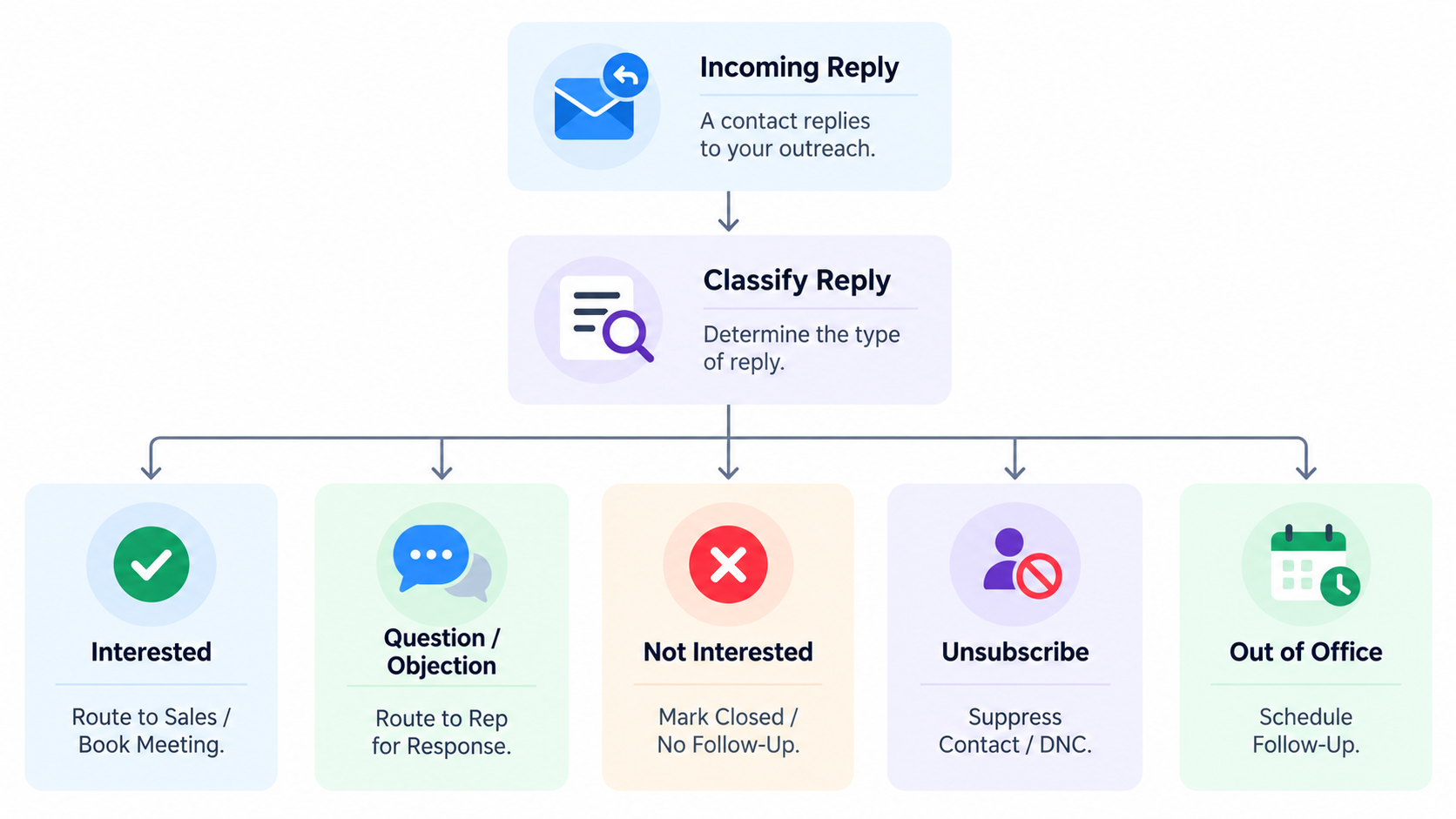
Use
a simple triage order:
- Positive and qualified — they want to talk, and they fit your target.
- Interested but not ready — they are open, but timing, budget, or priority is an issue.
- Objection only — they are reacting to price, timing, authority, or relevance.
- Not a fit — wrong role, wrong company, wrong use case.
- Auto-resolve — simple questions that can be answered with one clear reply.
This
is the core of reply handling: not every response needs the same level of
effort, but every response needs a decision.
The
fastest way to classify replies
Look
for three signals:
- Intent:
Are they asking to learn more, push back, or end the conversation?
- Fit:
Do they match your ideal customer profile?
- Timing:
Are they ready now, later, or not at all?
If you classify these three things first, the next message becomes much easier to write.
How
do you qualify a reply without overthinking it?
A
strong lead qualification process uses the same questions every time. You do
not need a complex scorecard to start.
Try
this practical set of checks:
- Need:
Do they have a real problem you solve?
- Authority: Are they the decision-maker, influencer, or delegate?
- Timing:
Is there a current project, deadline, or buying window?
- Budget:
Is there enough room to proceed, even if the number is not final yet?
- Next step: Can you move them to a call, demo, or follow-up date?
You
can use this as a quick filter, not a rigid interrogation. The point is to
identify whether the lead should be booked, nurtured, or disqualified.
A
simple qualification rubric
What
is the best way to answer common objections?
Most
objections are not a “no.” They are a request for clarity.
The
best reply qualification workflow treats objections as short detours, not dead
ends. Keep the answer brief, useful, and tied to the next step.
Common
objections and how to handle them
- “We already use something else.”
Acknowledge
the current tool, then answer the change question.
Example:
Makes sense. Many teams already have a workflow in place. The
reason people switch is usually to reduce handoffs and keep reply
handling, routing, and booking in one place. If it helps, I can show you the
shortest path from your current setup to a cleaner process.
- “Now isn’t the right time.”
Do
not pressure the lead. Clarify timing and preserve the relationship.
Example:
Understood. Would it be useful if I followed up next month, or
is there a specific trigger that would make this a better fit later?
- “How much does it cost?”
Answer
with a range, a framing statement, or a pointer to the pricing page if
appropriate. Keep it tied to value, not just the number.
Example:
Pricing depends on the setup and the parts of the workflow you
want to run. If you want the full picture, I can point you to the plan that
matches your use case and help you compare it against what you’re replacing.
For
product-specific pricing context, ReachHawks keeps this visible on its pricing
page.
- “Can you send more info?”
Do
not dump a giant deck into the thread. Send one useful asset and a clear next
step.
Example:
Absolutely, I’ll send a short overview. If it’s relevant, we
can book 15 minutes after you’ve had a look.
The rule: answer the objection, then re-open the path to a meeting.
How
do you route interested leads without losing context?
Routing
is where many workflows break. The lead is interested, but the thread moves to
another inbox, another tool, or another teammate, and the context disappears.
A
better routing step should preserve:
- the original message
- the qualification
notes
- the objection history
- the owner of the next
step
- the meeting or
follow-up status
That
is why a shared
inbox and connected CRM workflow matter. If everyone can see the thread, the
team does not need to reconstruct the conversation from memory.
A
practical routing model
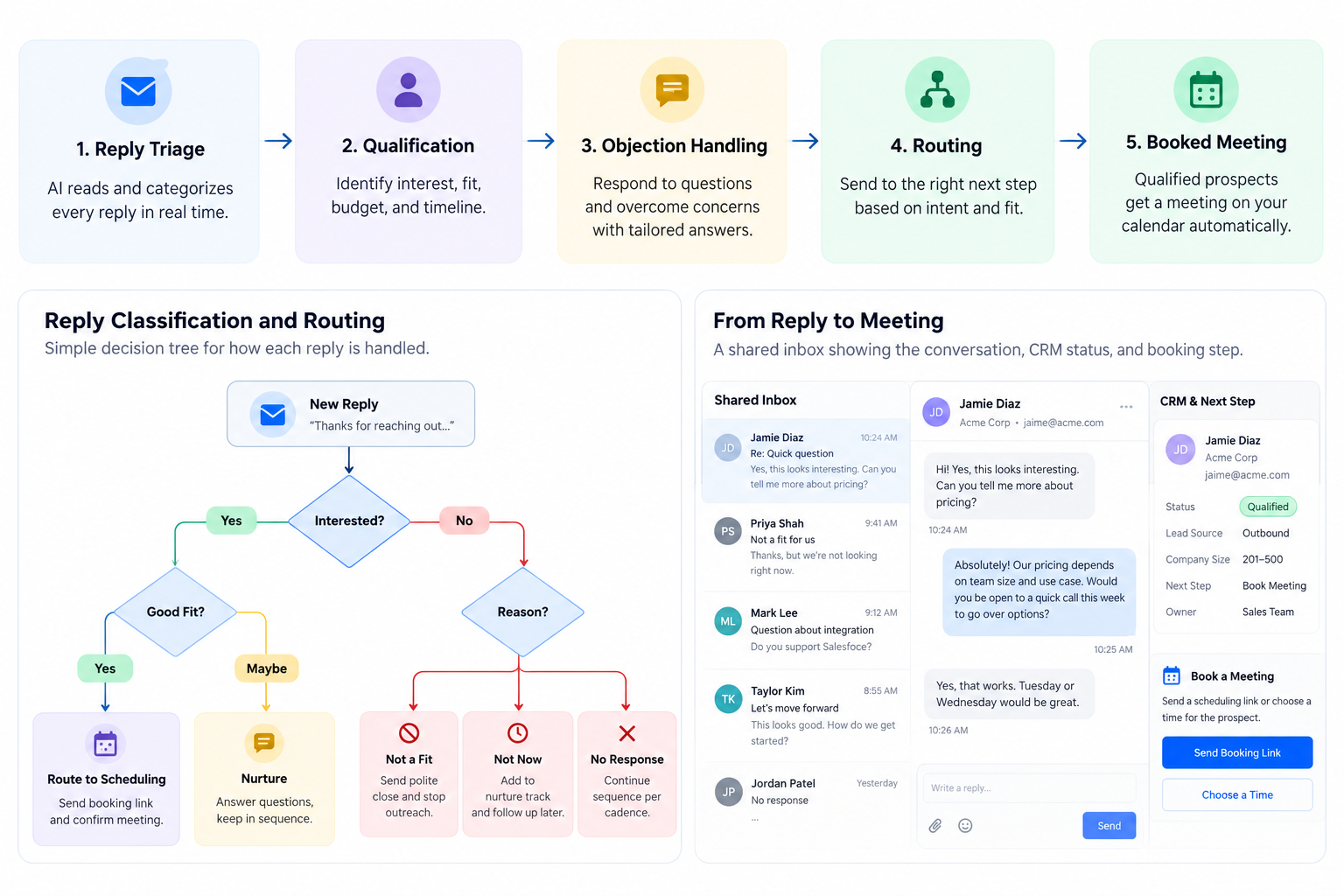
- Qualified now → send booking link or propose times.
- Qualified later → set a follow-up task with a date and reason.
- Needs specialist help → route to the right teammate with context.
- Needs approval → pause and wait for a human review.
- Not a fit → close the loop politely.
If
your system supports it, the workflow should also update the CRM automatically
so the next owner knows exactly what happened.
What
does a complete reply qualification workflow look like?
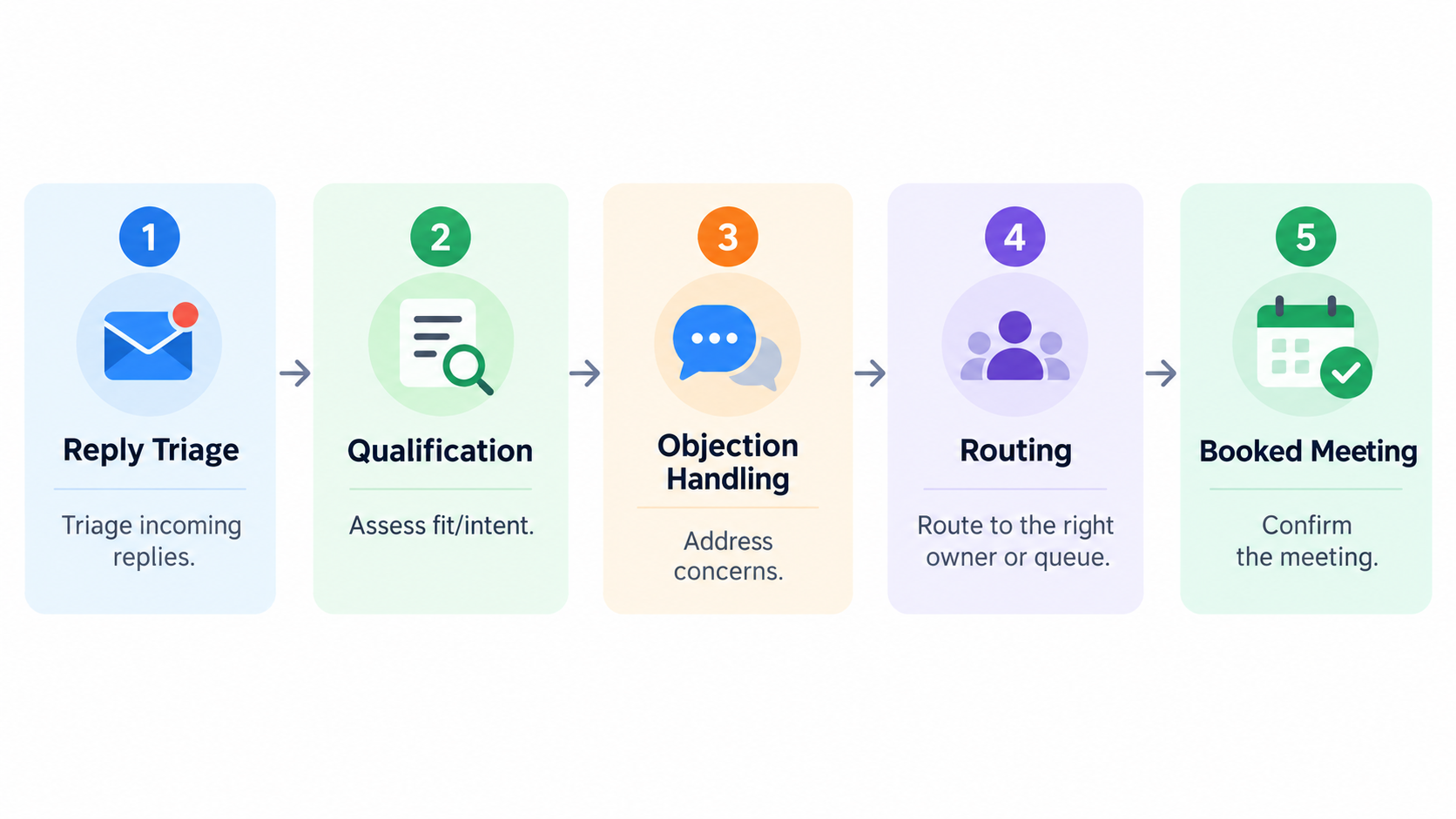
Here
is the full sequence you can use and adapt:
- Capture the reply from email or LinkedIn.
- Classify the reply into hot, warm, objection, not-fit, or simple question.
- Check fit and timing using need, authority, budget, and urgency.
- Respond with one clear action: book, answer, nurture, or disqualify.
- Preserve context in the shared inbox or CRM.
- Route the lead to the correct owner or follow-up step.
- Move to booking if the lead is qualified.
- Log the outcome so the team can see what happened next.
Example
workflow by reply type
This is where a connected workflow beats a disconnected one. The more handoffs you remove, the more meetings you keep.
How
can AI reply handling help without taking over?
AI
reply handling works best when it supports the workflow rather than replacing
the judgment call.
Use
AI for:
- identifying reply
intent
- drafting first-pass
responses
- summarizing thread
context
- suggesting routing
decisions
- preparing
booking-ready replies
Keep
human control for:
- sensitive objections
- pricing exceptions
- account-specific
nuance
- final approval before
sending
- strategic lead
prioritization
That
balance matters. The goal is speed with control, not automation for its own
sake.
If you want to see how ReachHawks frames this connected workflow, the Hawk AI Reply Agent page is a useful reference.
What
are the most common mistakes teams make?
A
lot of teams do not have a reply qualification problem. They have a context
problem.
Watch
out for these mistakes
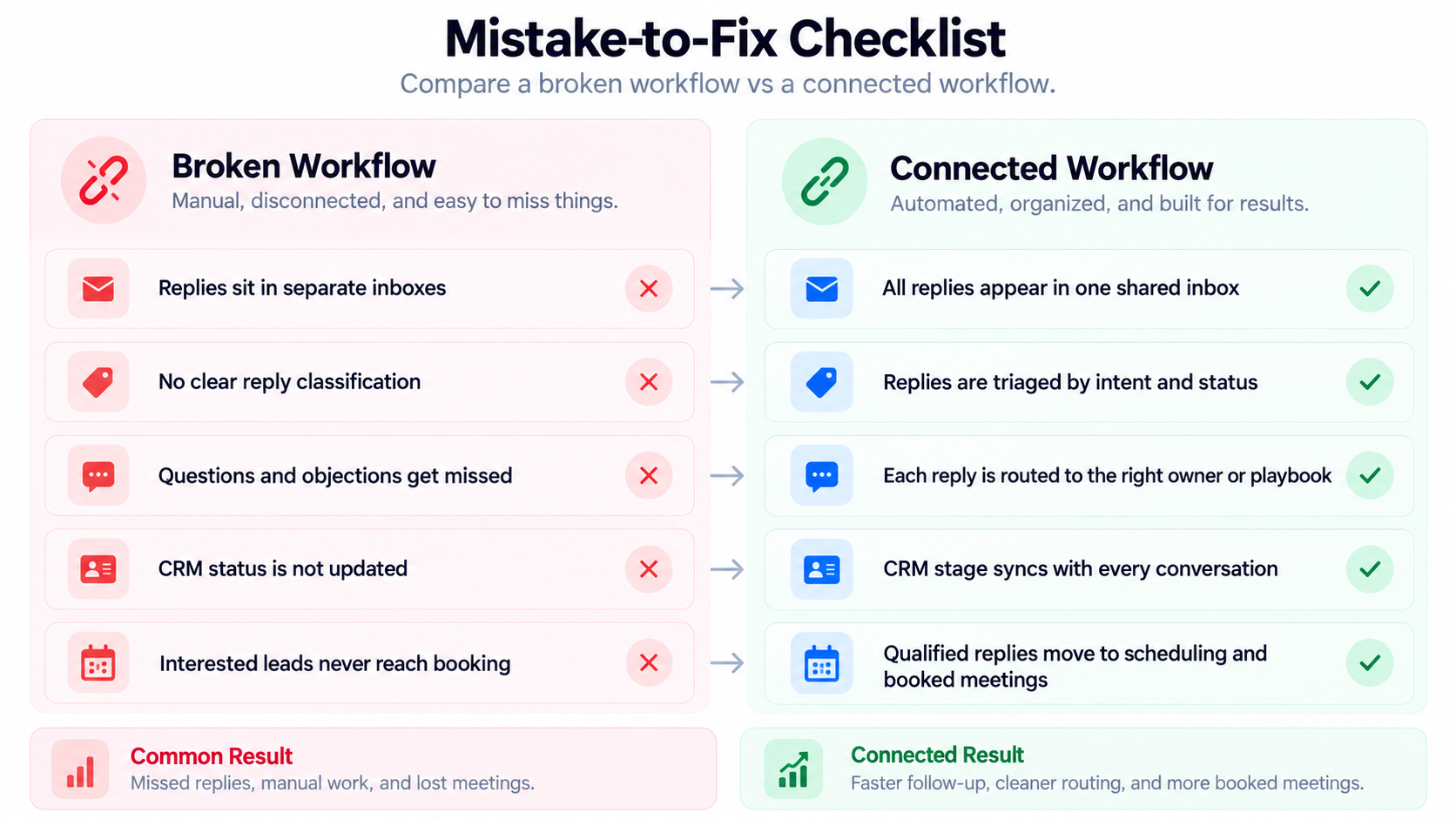
- Replying too slowly and losing the moment of interest
- Over-qualifying every lead with too many questions
- Treating objections like rejection instead of opening statements
- Sending leads to another inbox without full context
- Booking meetings too early before confirming fit
- Failing to log outcomes so nothing improves over time
- Using five tools for one conversation and forcing manual re-entry
A
good workflow fixes speed and context together.
How
should founders and small teams implement this in a week?
You
do not need a complete sales-ops rebuild to get better reply handling.
Try
a one-week rollout:
Day
1: Define your reply buckets
Agree
on the five core categories: hot, warm, objection, not fit, and routing needed.
Day
2: Write response templates
Draft
one short response for each common objection and one booking response for hot
leads.
Day
3: Set routing rules
Decide
who owns each lead type and where the context should live.
Day
4: Connect the calendar
Make
booking the default next step for qualified leads.
Day
5: Add CRM updates
Record
the reply
type, outcome, and next action automatically or manually.
Day
6: Review edge cases
Look
at confusing threads and refine the rules.
Day
7: Measure the friction
Ask:
where are replies getting stuck, and which step is slowing meetings down?
If you are building this inside a platform, ReachHawks’ broader main platform overview shows how outbound, inbound, CRM, and UniBox are designed to stay connected.
What
should you measure to know if the workflow is working?
Measure
the workflow around movement, not just volume.
Useful
indicators include:
- time
to first response
- percentage of replies
classified within the same day
- percentage of
qualified replies routed correctly
- booking rate from
positive replies
- number of follow-ups
needed before booking
- number of threads lost
to missing context
You do not need a complicated dashboard to learn something useful. Even a simple weekly review can show whether the workflow is improving.
FAQ:
reply qualification workflow
What
is the main goal of a reply qualification workflow?
To
quickly identify which inbound replies should become booked meetings, which
need objection handling, and which should be routed or closed without losing
context.
Should
every reply get a meeting link?
No.
Only the replies that show enough fit and intent should move straight to
booking. Some responses need a short answer first.
What
is the difference between reply handling and lead qualification?
Reply
handling is the act of managing the conversation. Lead qualification is the
decision process that determines whether the lead is worth moving forward.
Can
AI help with qualification?
Yes.
AI can help classify replies, summarize context, and draft responses. Human
review is still important for nuance, approvals, and final decisions.
Why
does context matter so much?
Because every handoff that loses context creates delay, confusion, and repeat questions. Context is what turns a reply into momentum.
In
summary...
The
key takeaway is that a strong reply
qualification workflow is not about answering faster alone. It
is about classifying
replies clearly, preserving context, routing leads correctly, and turning
genuine interest into booked meetings with less friction. If you build the
workflow around one shared conversation layer, you will spend less time chasing
context and more time closing the next step.